ORA requires financial entities to understand how their ICT assets, providers, business functions, risks, incidents, contracts, and controls relate to each other. Article 8 specifically mandates mapping dependencies between business functions, ICT assets, and third-party providers.
In practice, this information is scattered. Assets are in one register, providers in another, risks in a third. Contracts sit in legal. Incidents come from IT operations. Controls are managed by compliance. Nobody has the full picture.
The 360° Intelligence Hub puts it in one place.
What it does
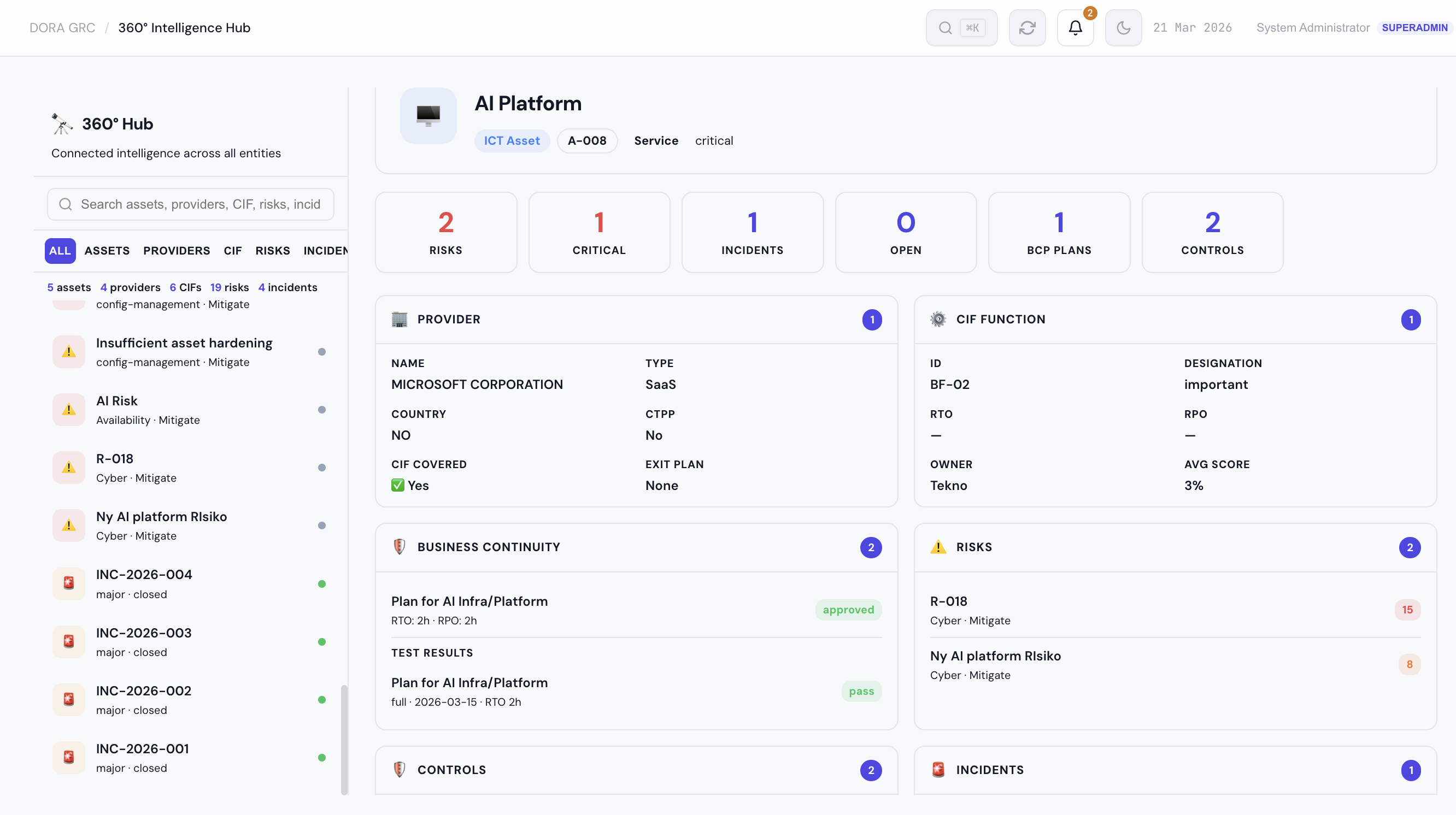
The Hub gives you a connected view of any entity in your ICT estate. Select an asset, a provider, or a CIF function, and you see everything linked to it: risks, incidents, contracts, controls, BCP plans, tests, sub-contractors, documents, and recovery objectives.
There are two ways to access it:
The full-page Hub — a split-panel interface with a searchable entity browser on the left and a detail view on the right. Use this when you want to explore your ICT estate, compare entities, or prepare for a supervisory review. The inline drawer — a slide-in panel that opens from any module. Working in the Risk Register and want to see what else is connected to an asset? Open its 360° view without leaving the page.Both show the same connected data. The Hub is for exploration. The drawer is for quick context.
Three entity types, three perspectives
Asset 360°
Select an ICT asset and see:
- Provider — who supplies it, their country, CTPP designation, exit plan status
- CIF Function — which critical or important function it supports, the function's criticality score
- Business processes — which processes depend on this asset
- Risks — every risk linked to the asset, with likelihood × impact scores colour-coded by severity
- Controls — the controls mitigating those risks, their implementation status, and DORA article reference
- Incidents — historical incidents involving this asset, with severity and resolution status
- BCP plans — business continuity plans covering this asset, with RTO/RPO targets and test results
- Tests — testing programme entries, scheduled dates, and outcomes
- AI systems — any AI systems using this asset, with EU AI Act risk tier classification
- Documents and evidence — linked policy documents, audit reports, and file attachments
At the top, KPI cards show counts at a glance: total risks, critical risks, incidents, open items, BCP plans, and controls.
Provider 360°
Select a provider and see everything that depends on them:
- ICT assets — all assets supplied by this provider, with classification and lifecycle status
- Contracts (Art. 30) — contract type, how many of the 11 mandatory DORA clauses are in place, contract value
- Register of Information — the provider's entry in your RoI, service description, and CIF function mapping
- Exit plan — status, last tested date, migration timeline
- Sub-contractors (Art. 28(7)) — the sub-contracting chain with hierarchy levels and risk tiers
- Concentration risk — aggregated view of all risks and incidents across the provider's assets
- Vendor questionnaires — assessment scores and risk ratings
- BCP plans and tests — continuity coverage for the provider's services
This is particularly useful for third-party risk management. Instead of checking contracts in one module, assets in another, and risks in a third, you see the full provider relationship in one view. When BaFin asks about your hyperscaler dependency or your NCA wants to see exit plan readiness, the answer is here.
CIF Function 360°
Select a Critical or Important Function and see:
- Recovery objectives — RTO, RPO, and MTPD derived automatically from process-level Business Impact Assessments. The Hub takes the most aggressive (lowest) value across all linked processes and shows the source.
- Business processes — the processes that make up this function, with their individual RTO/RPO targets
- BIA assessments — process-level impact analysis with tier classification and scores
- ICT assets — every asset supporting this function
- Third parties — providers linked through the dependency chain
- Risks and incidents — aggregated from all linked assets
- Tests — testing coverage for this function
- BCP plans — continuity plans and their test results
The recovery objectives display is worth highlighting. DORA Article 11 requires defined RTO, RPO, and MTPD for every critical function. The Hub derives these from your BIA data automatically, colour-codes by urgency (red if under 1 hour, amber if under 4 hours), and warns you if processes exist but no BIA has been completed.
Cross-entity navigation
The Hub is not just a read-only dashboard. Every linked entity is clickable. You can navigate from a provider to one of its assets, then to a risk on that asset, then to the control mitigating that risk. Each click updates the detail view instantly. No page reloads, no searching.
This is how supervisory questions get answered quickly. "What assets depend on this provider?" Click the provider, see the asset list. "What happens if this function goes down?" Click the function, see the BCP plans and recovery objectives. "Is this risk being controlled?" Click the risk row, see the linked controls.
Search and filtering
The Hub sidebar has real-time search across all three entity types. Type a name or ID and the list filters instantly. Tab buttons let you narrow to assets only, providers only, or CIF functions only. Count chips update to show how many entities match your filter.
How it helps with DORA compliance
The 360° Hub directly supports several DORA requirements:
Article 8 — Identification and classification. The Hub visualises the dependency mapping that Article 8(4) requires: functions → processes → assets → providers. Instead of maintaining this in a spreadsheet, it is derived from your live data. Article 11 — Business continuity. Recovery objectives (RTO/RPO/MTPD) are derived from BIA assessments and linked to BCP plans with test results. You can see at a glance whether a critical function has adequate continuity coverage. Article 28 — Third-party risk management. The Provider 360° aggregates everything your NCA will ask about: contracts, exit plans, sub-contractors, concentration risk, and the Register of Information entry. Article 30 — Contractual requirements. Each provider's contract shows how many of the 11 mandatory DORA clauses are in place. You can see which contracts need attention without opening each one individually. Article 5 — Governance reporting. The KPI cards and connected data views provide the information that management body reporting under Article 5(4) requires. Instead of assembling data from multiple sources, it is pre-aggregated.Technical details
The Hub fetches all related data for an entity in a single API call. Each 360° endpoint runs 12–16 queries in parallel using fault-tolerant fetching — if one query fails (for example, no BCP plans exist), the rest of the view still loads normally.
Client-side caching uses a stale-while-revalidate pattern. When you revisit an entity within two minutes, the cached view loads instantly while fresh data is fetched silently in the background. This makes navigating between entities feel immediate.
The Hub works on desktop and mobile. On smaller screens, the sidebar collapses and the detail cards stack into a single column.
Getting started
The 360° Intelligence Hub is available to all DORA GRC users with Pillar 1 read access. No additional setup is required — the Hub automatically pulls data from your existing registers.
The more data you have in the platform (assets, providers, functions, risks, contracts), the more useful the Hub becomes. If you are just starting, begin with your ICT asset register and provider register. The dependency connections build from there.
Start your free trial → Explore all features →